As the storage capacity of the hard disk drives emerges with no apparent limit (all hail Moore's law), old disks get obsolete no matter how ground-breaking they were a couple of years ago. I decided to collect some of the old hard disk drives here so that at least their memory would be conserved. The only selection rule for showing an old HDD I had is that I have to have that one somewhere at home :) so my choices will not be equalized in any sense, including technology, manufacturer and so on.
 The first one I found is a Seagate ST-251 from 1994. Using MFM coding, this device was capable of a fantastic 40MB storage space using 6 heads on 3 plates. The maximum transfer rate is 625KB/s with its ST-412 MFM controller. It is an interesting fact that Seagate keeps a good record of its old products, even such an old device is on their webpage here.
These 5.25" units with their massive metallic case indeed represent some sort of everlasting elegance :)

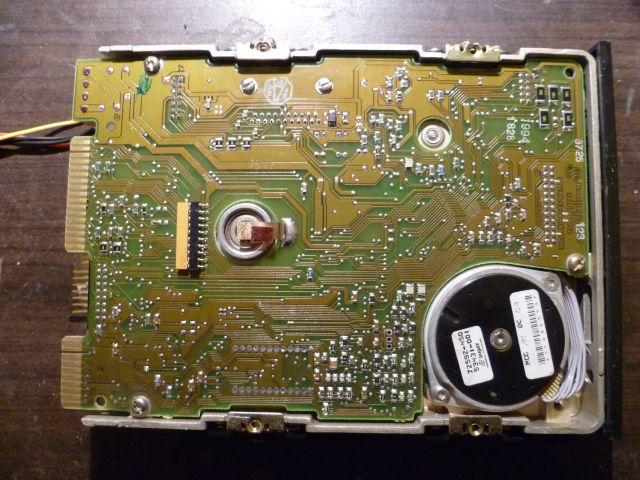
Even though the electronics of the hard drive was restricted to the most basic functionality (and the rest was done by the control card) it seems quite complex: many application-specific ICs and lots of miscellaneous circuit elements can be spotted.
 The PCB connector itself is a long time extinct part: on the left, the 34 pol connector is allocated for the MFM control signals, whereas the 20 pol on the right is for the MFM data R/W signals. The jumpers in the middle are dedicated to set the address of the drive, making it possible to chain up to 4 drives in a computer. Note that the power connector is already the standard PATA 4 pin connector supplying 5V/12V. An interesting consequence of the separate control card is that the bad sectors found during factory testing are printed on the case of the drive with the corresponding C/H/S values. Nowadays such maps are stored by the HDD electronics.
 After removing the PCB, we get a good sight to the two motors. The one in the middle spins the plates at 3600 rpm and is most likely a brushless 3 phase motor. The other one in the corner is a stepper motor and moves the R/W heads above the plates. While steppers have eventually been replaced by more compact and lightweight solutions, the plate spinner motors are essentially the same even nowadays (they might be a bit smaller though).


These old and robust devices did not really follow today's trend of being low-power and silent. According to the data sheet, it consumes up to 12W and has a characteristic head-bang noise when starting up which is a result of the head calibration process in order to find track0. As a conclusion watch the video I made with the clean area cover removed so that we can see what is going on.


